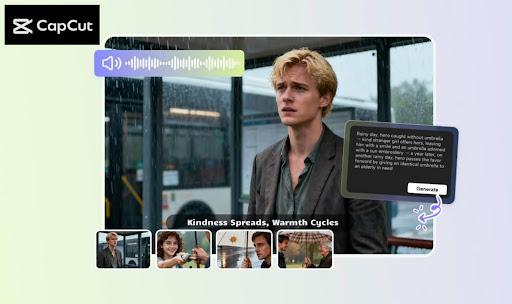
The use of corporate video marketing has become an important aspect of business communication with the audience, the presentation of products, and the increase in brand recognition. Nonetheless, the development of quality videos is associated with a complex set of procedures, such as idea generation and scriptwriting, production, and editing. The AI Writer and AI Storyboard tools by CapCut are meant to remove the complexity of these processes. In this article, we will look at how CapCut AI Storyboard can really enhance the production of corporate videos, in that it can enable businesses to plan and visualise their videos with ease and therefore save resources and time.
Now, we can explore the way that CapCut AI Storyboard can overhaul corporate video marketing and also improve the creative process.
Why Visual Planning Is Key in Corporate Video Marketing
Good corporate video production is not only measured by an excellent script but also by the appearance of the video, the flow of it, and the way a given scene helps in delivering the message of the brand. The old method of video production presupposes a thorough planning of scenes, camera shots, and transitions, which could be time-consuming. CapCut AI Storyboard can resolve these issues by automating the storyboarding process, which will provide the marketers with a clear audiovisual representation of the video even before the filming process has started. This makes the production in line with the creative vision and the reduction of reshoots.
Visualising the Video Before Production
Creating a video is one of the most challenging endeavours because it is difficult to maintain the same idea throughout production. AI Storyboard can be used to plan every scene and transition visually, whether you are making a corporate explainer video, an internal training module, or even a brand promotion piece. This visual pictorializing will assist the marketing teams to determine how the video will unfold, thus they can make changes before actual production.
The development of the visual roadmap in AI Storyboard helps to make the video content consistent, efficient, and business-oriented.
Improving Efficiency with AI-Generated Storyboarding
The traditional way of developing a storyboard requires several stages: sketching, scene planning, selection of transitions, and plotting out every image. These are automated with CapCut AI Storyboard. The AI produces a complete visual sketch of the script you feed it, which saves time and effort during the planning process. This enables video producers to work on more critical areas of the work, including honing their message and mastering the visual look.
Step-by-Step Guide to Using CapCut AI Storyboard for Corporate Video Marketing
Step 1: Upload Script or Create with AI
Open CapCut and select the option of the main interface: the AI video maker. This will open the workspace, and you can begin making your AI Storyboard.
The feature of an instant AI video will start fast with a button. You can look at and change the appearance of your storyboard on the right side of the screen in a window. Depending on the purpose of the video and the identity of your brand, you can choose the video style, i.e., cartoon 3D, whimsical, or futuristic.
You can either enter your already written script or have CapCut AI write one with your selected theory or topic. The step helps to make the work easier by giving you a point to start your storyboard.
Step 2: Customise Voiceovers and Timing
After uploading or creating the script, the second thing would be to select the voiceover for the video. A drop-down menu allows you to choose a voice and preview the voice by clicking on the headphone icon. This is the possibility to personalise the audio experience based on the voice of your brand.
Then, select the required length of your storyboard so that it corresponds to the length of your video. You can change the timing, whether you want a one minute long video or a bigger corporate explainer. After you are satisfied, choose the Create button to get CapCut AI to create the storyboard.
Step 3: Edit and Enhance the Storyboard
Once the AI has created the storyboard, you have the option of customising the images and scenes further. The left panel has a category for improving your video.
In the Elements tab, you can also experiment with different templates of captions that can be used to make the text of the video visually more attractive. CapCut has an AI edit feature as well, where you can highlight specific keywords, stickers, or effects in your captions and can be set at different levels of intensity to enhance your emphasis.
The Music section allows you to select an extensive range of background music depending on the mood of your video. You will be able to find a specific track or explore various categories and find the right one.
Step 4: Export or Further Edit Your Video
After you are content with appearance planning, you can produce the video by clicking on Export. The new window will be displayed, where you will have the opportunity to set the name of the file, the video resolution (up to 4K), and any other settings, and then save.
You can do further refinements by clicking on Edit more, and then you will see the advanced editing tools of CapCut, and you can further refine the appearance and sound, and then export the final video.
Key Benefits of Using CapCut AI Storyboard in Corporate Video Marketing
- Time-Saving: AI Storyboard is a visual plan automator, which saves the time spent on drawing or sketching storyboards by hand. This will enable marketing departments to concentrate on more creative and content development.
- Consistency and Clarity: AI-generated storyboard makes sure that the image of the video corresponds to the script and is a clear and consistent plan of the production process.
- Creative Flexibility: You can customise all the available options, though the AI will come up with the base storyboard. You are able to customise the aspects of such things as video style, voiceover, and timing to suit your brand.
- Efficiency: AI Storyboard is seamlessly integrated with the CapCut editing suite and makes the transition between the planning and production stages as efficient as possible.
- Increased Cooperation: AI Storyboard enables the collaborative efforts of the creative team and stakeholders to agree on a specific vision and ensures that all parties are on the same track prior to the start of the filming process.
Conclusion
The AI Storyboard program of CapCut is a breakthrough in video marketing for corporations. It also simplifies the process of planning the video, offering organizations a clear roadmap to follow, which enables their video content to meet creative goals. AI Storyboard will enable marketers to spend less time and resources to produce high-quality corporate videos by automating the time-intensive processes of visual planning and boosting teamwork. Begin using CapCut AI Storyboard now and transform your corporate video level marketing approach, and make your brand vision a reality with ease!